Insta Pro Download – Latest Version for Android
Insta Pro is a modified Instagram app for Android, and this page has the file ready to download. Tap the button below, install the APK, and follow the short steps to get started. The file is free, and the whole process takes about five minutes. Anyone who wants the full guide on features and settings can read the main Insta Pro APK page.
 v15.90 Latest
Insta Pro APK File Details
| Detail | Info |
|---|---|
| App name | Insta Pro (also written InstaPro) |
| Category | Instagram mod, social |
| Version | 15.90 |
| File size | 168 MB |
| Works on | Android 5.0 or newer |
| Price | Free |
| Language | English and a few more |
| Root needed | No |
| Last updated | 2 days ago |
The numbers above are the latest. After the download, check that the version and size match the table.
Before You Download Insta Pro APK
- Free space: keep about 1 GB free, since the file is 168 MB and the app grows with use.
- Backup: copy important photos and chats to another place first.
- Connection: use Wi-Fi so the file finishes in one go.
Insta Pro Requirements
- Android: 5.0 or newer. Newer versions run smoother.
- RAM: 3 GB feels smooth. 2 GB works, and reels run best with other apps closed.
- Free space: about 1 GB.
- Phone type: Android only. iPhones use a different file type.
How to Download Insta Pro APK?
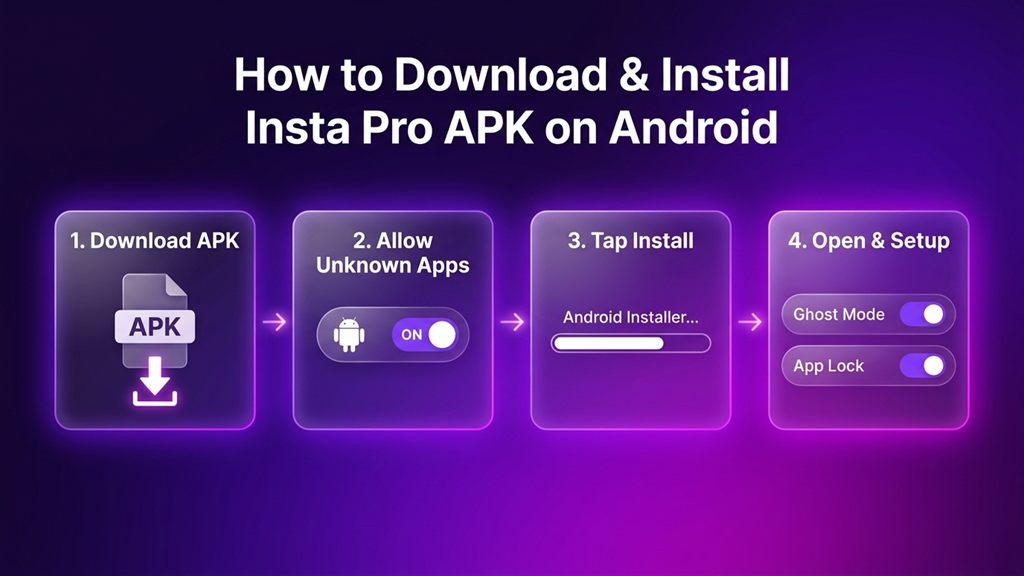
- Open this page on the Android phone.
- Tap the Insta Pro APK Download button.
- Wait for the file to finish. It is 168 MB, so a steady Wi-Fi line helps.
- If the browser shows a note about the file type, read it and decide. Android shows this note for any APK from outside the Play Store.
- Open the Downloads folder and find the file.
How to Install InstaPro on Android?
- Tap the downloaded APK file.
- When Android asks for permission, switch on Allow from this source for the browser or the Files app.
- Tap Install and wait for the bar to finish. If Play Protect offers a scan, let it run.
- Tap Open.
- Log in. A second account is a good way to try the app first.
After the install, switch the unknown-apps permission off again.
What to Check After Installing?
- Open the app settings and compare the version number with the table above.
- Open one post and look for the download icon.
- Open the settings menu and find the Ghost Mode options.
- Turn on App Lock if the phone is shared.
Quick Fixes for Download and Install
| What you see | Likely cause | Fix |
|---|---|---|
| Download pauses halfway | Weak connection or low space | Switch between Wi-Fi and mobile data, free space, try again. |
| Package parsing message | Incomplete file | Download again on steady Wi-Fi and compare the size. |
| App Not Installed | An old copy is on the phone or storage is low | Remove the old app, free space, install again. |
| Play Protect notice | Android shows it for apps from outside the Play Store | Tap More details, then Install anyway. |
| Install button does nothing | Unknown-apps switch is off | Allow installs from the browser or Files app. |
Need an Older Version?
An older version helps when a newer build runs slowly on an old phone. Remove the newer app first, because Android does not install an older build over a newer one. Then install the older file the same way.
How to Update?
When a new version appears on this page, download it and install it over the old app. Accounts and settings usually stay in place. A backup first is always a good idea.
FAQs
Yes. The file is free.
Version 15.85 is 172 MB.
Android 5.0 or newer.
No. APK files are made for Android phones.
It looks the same but adds tools like downloads, Ghost Mode and themes. It is installed by hand and updated by hand.
Remove any old copy, free some space, and install again. The quick fixes table above covers the common messages.
The main Insta Pro APK page covers features, settings, updates and tips in detail.
Final Note
Insta Pro APK installs in a few steps, and a second account is a good way to test it first. Check the version number after installing, and visit this page again for new versions.
Last updated: [2 days ago]. Version shown: 15.90.